
You’re sitting in a school computer lab, or maybe you’re on your lunch break at work, and you click a video only to see that dreaded gray screen: “This video is unavailable.” It’s one of the more annoying moments of a digital day, and it happens to millions of people every single day. That’s exactly why so many people search for unblocked youtube solutions, and honestly, the demand isn’t slowing down in 2026.
This guide walks you through everything worth knowing about youtube unblocked access: why the blocks happen in the first place, which tools actually work, which ones you should avoid, and how to stay safe while doing it. No fluff, no filler — just the real information you came here for.
Why Is YouTube Blocked in the First Place?
Before you go looking for a workaround, it helps to understand why the wall exists at all. YouTube doesn’t get blocked randomly. There’s almost always a specific policy, law, or technical reason behind it, and knowing which one applies to your situation actually helps you pick the right fix.
School and Library Network Filters
If you’re a student, you’ve probably run into this more than anyone else. Schools in the United States are required to follow the Children’s Internet Protection Act (CIPA), which mandates content filtering on networks that receive certain types of federal funding. Rather than reviewing every video individually, schools take the easier route: block YouTube entirely, or block huge chunks of it, using tools like GoGuardian, Securly, or Lightspeed Systems.
Here’s the thing — these filters aren’t smart enough to tell the difference between a chemistry tutorial and a random gaming stream. They just see “youtube.com” and shut the whole domain down. That blanket approach is exactly why so many students end up needing a youtube unblocked proxy just to finish a homework assignment that requires watching an educational video.
Workplace and Corporate Firewalls
Offices block YouTube for different reasons than schools do. It’s rarely about content and almost always about:
- Bandwidth management — video streaming eats up network resources fast, and IT departments don’t want the whole team’s internet slowing to a crawl.
- Productivity concerns — some companies just don’t want employees watching videos during work hours.
- Security policy — a handful of companies restrict access to reduce exposure to malicious ads or scripts embedded in third-party video content.
If you’ve ever tried to open YouTube on a work laptop and hit a wall, this is almost certainly why.
Geographic and Regional Restrictions
Not every video is available everywhere, and this one trips people up constantly. YouTube licenses content on a country-by-country basis. A music video might be perfectly viewable in the UK but geo-blocked in Germany because of a licensing dispute with a local rights holder. This isn’t YouTube being difficult on purpose — it’s contract law working exactly as intended, just in an annoying way for viewers.
Then there’s outright government censorship. Countries like China, Iran, North Korea, and Turkmenistan block YouTube at the national level, sometimes for years at a stretch. In those cases, no amount of clicking refresh will fix it. You need a tool that actually reroutes your traffic.
ISP-Level Throttling or Blocking
This one’s less common but still worth mentioning. Some internet service providers slow down or restrict streaming traffic during peak hours to manage network load. It’s rarer in most Western countries these days thanks to net neutrality debates and consumer pushback, but it still happens in parts of the world with less regulated internet infrastructure.
Your Main Options for Getting Unblocked YouTube Access
So, you know why you’re blocked. Now, what actually works? There are five real methods people use, and they’re not all created equal. Let’s break them down honestly.
| Method | Best For | Encrypts Traffic? | Typical Cost |
|---|---|---|---|
| Proxy website | Quick, one-off unblocking | No | Usually free |
| VPN | Regular, secure use | Yes | $3–$12/month |
| Smart DNS | Streaming without slowdown | No | $3–$6/month |
| Browser extension | Convenience on one device | Sometimes | Free to $5/month |
| Tor Browser | Maximum anonymity | Yes | Free |
Proxy Websites
A proxy site sits between you and YouTube. Instead of your computer contacting YouTube’s servers directly, it sends the request through the proxy first, which then fetches the content on your behalf and hands it back to you. It’s the digital equivalent of asking a friend to grab something from a store you’re not allowed into — the store sees your friend, not you.
This is the fastest, easiest way to get an unblocked youtube proxy experience going, especially on a school or work computer where you can’t install software.
VPNs
A Virtual Private Network encrypts your entire internet connection and routes it through a server somewhere else in the world. It’s more thorough than a proxy because it protects everything you do online, not just your browser tab. If you care about privacy as much as access, this is generally the better long-term option.
Smart DNS
Smart DNS services redirect only the specific parts of your traffic that reveal your location, without encrypting anything. That makes them faster than most VPNs, which is why streaming enthusiasts like them. The tradeoff? Zero privacy benefit. Anyone monitoring the network can still see exactly what you’re doing.
Browser Extensions
These are lightweight proxy or VPN tools built directly into your browser. They’re convenient because you don’t need to install separate software, but they usually only protect traffic inside that one browser tab — everything else on your device stays exposed.
Tor Browser
Tor routes your traffic through multiple encrypted layers across a volunteer-run network, making it extremely difficult to trace. It’s the most private option by far, but it’s also the slowest, which makes it a rough choice for video streaming. Most people don’t reach for Tor unless privacy is genuinely their top priority.
How Does a YouTube Unblocked Proxy Actually Work?
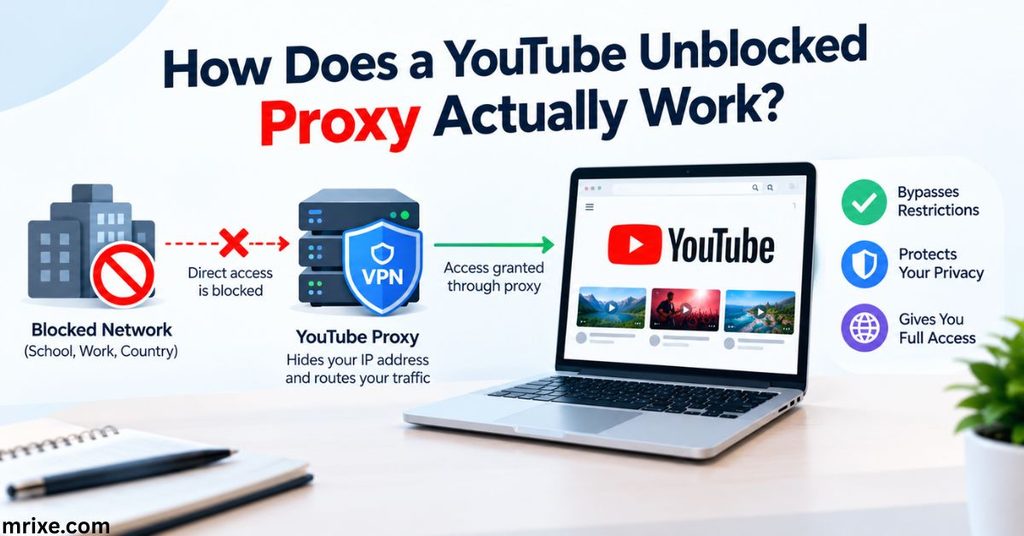
Let’s get a little more technical, but not too much. Here’s the basic flow, step by step:
- You type a YouTube URL into the proxy site.
- The proxy server receives that request instead of YouTube receiving it directly.
- The proxy fetches the video data from YouTube, using its own IP address rather than yours.
- YouTube sends the content back to the proxy, having no idea it came from you.
- The proxy forwards that content to your browser, and the video plays like normal.
Think of it like a relay race baton pass. YouTube only ever sees the proxy’s “leg” of the race, never yours. That’s the whole trick behind youtube unblocked access through a proxy — it’s simple in concept, even if the technical plumbing underneath is more complex.
One important caveat: because most free proxies don’t encrypt your data, anyone else monitoring the same network (your school’s IT admin, for instance) can potentially still see which sites you’re visiting, even if they can’t see the specific video content. It hides your destination from YouTube’s perspective, not necessarily from your own network’s perspective.
YouTube Proxy vs. VPN vs. Smart DNS: What’s the Real Difference?
People throw these terms around interchangeably, and honestly, that’s where a lot of confusion starts. Let’s clear it up for good.
A proxy reroutes traffic for a single site or application — usually just your browser. It won’t touch anything else running on your device, and it typically skips encryption altogether, which is why it’s fast but not private. A VPN, on the other hand, wraps your entire internet connection in encryption and reroutes all of it through a remote server, protecting you at the operating system level rather than just inside one browser tab. Smart DNS splits the difference in an odd way: it reroutes only the location-identifying parts of your connection, so it’s fast like a proxy, but it doesn’t offer the security benefits of a VPN.
Here’s a comparison that puts the differences side by side:
| Feature | Proxy | VPN | Smart DNS |
|---|---|---|---|
| Encrypts traffic | No | Yes | No |
| Hides IP address | Yes | Yes | No |
| Works across entire device | No | Yes | Yes |
| Speed | Fast | Moderate | Fast |
| Best for | Quick, occasional access | Regular use + privacy | Streaming quality |
| Setup difficulty | Very easy | Easy | Moderate |
If you just need to watch one blocked video during a school break, a proxy gets the job done in seconds. If you’re going to be doing this regularly, or if privacy actually matters to you (say, you’re in a country with heavy censorship), a VPN is worth the small monthly cost.
Who Actually Uses YouTube Unblocked Tools?
It’s a wider group than most people assume. Here’s a rough breakdown of the most common users:
- Students stuck behind school network filters that block educational content along with everything else
- Employees who occasionally need to access work-relevant video content that IT has restricted
- Travelers who find their favorite channels geo-blocked while abroad
- Users in restrictive countries where YouTube access is limited or banned outright at the government level
- Privacy-conscious viewers who simply don’t want their ISP tracking every video they watch
- Content researchers and journalists working across regions with different content licensing
One student we’ll call “Maria” (a composite of a pattern countless people run into, not a specific real person) put it well when describing the frustration: “I needed to watch a chemistry demonstration for a lab report, and the school filter blocked the entire platform because of one flagged word in the title.” That kind of overcorrection is incredibly common, and it’s the exact reason youtube unblocked searches spike during the school year.
Is It Safe to Use a YouTube Unblocked Proxy?
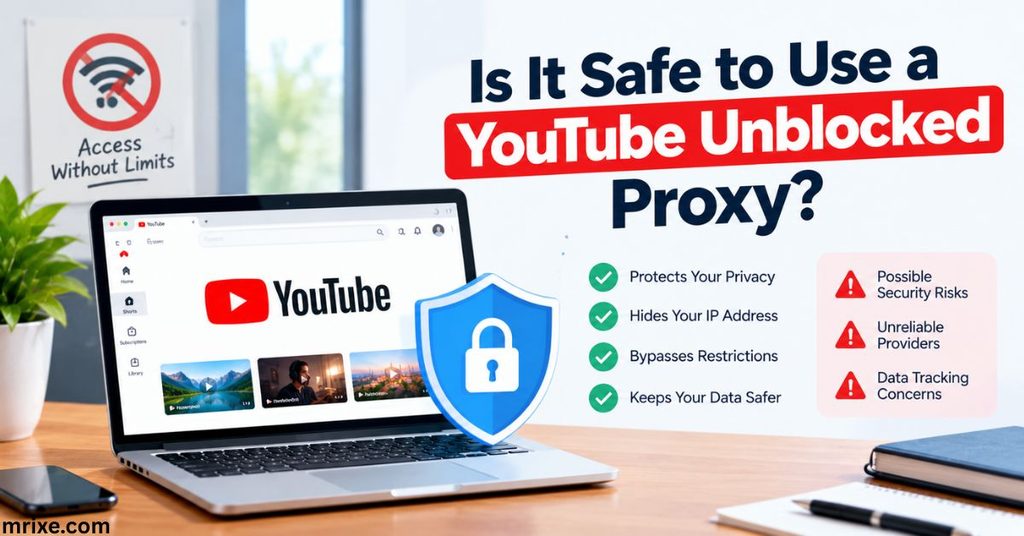
This is the question that matters most, and it’s the one too many guides skip entirely. The honest answer: it depends heavily on which proxy you use.
The Real Risks
Free proxy sites make their money somehow, and it’s rarely from ads alone. Some of the more common risks include:
- Data logging and selling — many free proxies keep logs of your browsing activity and sell that data to advertisers.
- No encryption — since most proxies don’t encrypt traffic, anyone else on the same network can potentially see which sites you’re visiting.
- Malicious ad injection — some shady proxy sites insert their own ads or scripts into the pages you visit, occasionally including malware.
- Fake or cloned proxy sites — bad actors set up lookalike proxy sites specifically to harvest login credentials or personal information.
How to Spot a Safer Proxy Site
You can’t eliminate risk entirely with free tools, but you can reduce it. Look for these signs:
- HTTPS encryption on the proxy site itself (check for the padlock icon in your browser)
- A clear, readable privacy policy — vague or missing policies are a red flag
- Minimal, non-intrusive ads — sites plastered with pop-ups are usually cutting corners elsewhere too
- No requests for personal information — a legitimate proxy never needs your email, name, or payment details just to unblock a video
“The biggest mistake people make is assuming ‘free’ means ‘no cost.’ With a lot of proxy tools, your browsing data becomes the actual price of admission.” — a common warning among cybersecurity researchers who study ad-supported proxy networks.
If you’re only unblocking YouTube occasionally, the risk is generally manageable as long as you’re careful. If you’re doing it daily, it’s worth paying a few dollars a month for a reputable VPN instead, since the data protection alone tends to be worth the cost.
Is Unblocking YouTube Against the Rules?
Let’s separate two very different questions here, because people often mix them up: is it illegal, and is it against policy?
In most countries, using a proxy or VPN to access YouTube isn’t illegal. The tools themselves are legal to use in the vast majority of places, including the US, UK, Canada, and most of Europe. A handful of countries — China, Russia, and the UAE among them — do restrict VPN use more heavily, sometimes requiring government-approved providers only, so it’s worth knowing your local laws if you’re traveling somewhere with tighter regulations.
Policy is a different story, though. Bypassing a school’s or employer’s network filter, even with a completely legal tool, can still violate that organization’s acceptable use policy. Getting caught doesn’t usually mean legal trouble, but it can mean a conversation with an IT administrator, a formal warning, or in some school settings, a temporary loss of device privileges. It’s worth weighing that risk against how badly you actually need the access.
YouTube’s own Terms of Service don’t specifically ban viewers from using proxies or VPNs to watch content, though the platform does reserve the right to restrict access it detects as automated or abusive. For a normal person just trying to watch a blocked video, this isn’t something to worry about.
How to Use a YouTube Unblocked Proxy (Step-by-Step)
Ready to actually try it? Here’s the basic process most proxy sites follow:
- Search for a reputable proxy site. Stick with well-known, established options rather than random results buried on page five of a search engine.
- Open the proxy site in your browser. No downloads or installations needed for most web-based proxies.
- Copy the YouTube video URL you want to watch.
- Paste the URL into the proxy’s input field, then hit “Go” or “Unblock.”
- Wait for the page to load. This can take a few extra seconds compared to a direct connection, since your traffic is taking a detour.
- Watch your video. Playback quality might dip slightly depending on the proxy server’s speed and location.
A few honest expectations to set here: don’t be surprised if video quality drops a notch, if ads take longer to load, or if some proxy sites simply don’t work with every video (live streams in particular can be hit or miss). It’s a workaround, not a perfect replacement for direct access.
A Quick Note on Watching Unblocked Live Content
Live streams are trickier to unblock than regular uploaded videos. A youtube unblocked live stream requires continuous data flow rather than a single file transfer, and a lot of free proxies simply aren’t built to handle that kind of sustained traffic smoothly. If you’re trying to catch a live event through a proxy and it keeps buffering or dropping, that’s a known limitation, not necessarily something you’re doing wrong. A VPN generally handles live content far more reliably than a basic proxy does.
Best Alternatives If You Want More Reliability
If a free proxy leaves you frustrated with slow load times or blocked features, here are your next-best options:
- A paid VPN subscription — more consistent speeds, better security, and works across your whole device rather than just one browser tab
- Downloading videos for offline viewing (where YouTube’s own offline feature or your organization’s policy allows it) — sidesteps the streaming issue entirely
- Requesting a filter exception — in school or workplace settings, sometimes the simplest fix is asking IT to whitelist a specific educational channel or video
- Using a mobile hotspot — if you’re on a restricted network, switching to cellular data bypasses the network-level filter completely (though this uses your own data plan)
None of these are flashy, but they’re often more reliable long-term than hunting for a fresh free proxy every time an old one stops working.
Frequently Asked Questions About youtube unblocked
Is a YouTube unblocked proxy free to use?
Most are, yes. The majority of proxy sites don’t charge a subscription fee, and instead make money through advertising. Some offer a “premium” tier with faster speeds or fewer ads, but the core unblocking function is typically free. Just remember: free often comes with data-privacy tradeoffs, so weigh that against how often you’ll actually use it.
Does a YouTube unblock proxy work on mobile devices?
Yes, in most cases. Since proxy sites run inside your browser rather than requiring installed software, they generally work fine on both Android and iOS browsers. That said, mobile proxy performance can be a bit less consistent than desktop, particularly for higher-resolution video or live streams.
Can my school or employer see that I used a proxy?
Possibly. While a proxy hides the specific site you’re visiting from YouTube’s perspective, your network administrator can often still see that traffic was routed to an unfamiliar third-party domain, even without seeing the video content itself. Sophisticated network monitoring tools can sometimes flag proxy usage as suspicious activity, so this isn’t a fully invisible workaround.
What’s the real difference between a proxy and a VPN?
A proxy reroutes traffic for a single browser or app without encrypting it, while a VPN encrypts your entire device’s internet connection and routes it through a remote server. Proxies are faster and easier to use for quick, one-off access; VPNs are more secure and better suited for regular use.
Will using a proxy slow down my video quality?
Often, yes, at least a little. Because your data is taking a longer route — through the proxy server before it reaches YouTube — you might notice slightly lower resolution, longer buffering times, or a small lag before playback starts. The exact slowdown depends on the proxy server’s location, current traffic load, and your own internet speed.
Final Thoughts
Getting unblocked youtube access isn’t complicated once you understand your options. A proxy works great for quick, occasional use — pop in a URL, watch your video, move on with your day. A VPN makes more sense if you’re doing this regularly or if privacy is a real concern for you. Smart DNS suits people chasing the smoothest possible streaming experience without caring much about encryption.
Whichever route you pick, the smartest move is staying informed rather than just grabbing the first free tool you find. Check for HTTPS, read the privacy policy if there is one, and be honest with yourself about how much risk you’re comfortable taking on for the sake of convenience. YouTube isn’t going anywhere, and neither are the filters blocking it — but now you know exactly how to work around them, safely and smartly, heading into the rest of 2026.

Nathan Cooper is a humor writer who enjoys creating clever puns, witty jokes, and lighthearted content that brings smiles to readers. He loves sharing fresh, family friendly humor that’s fun, engaging, and easy to enjoy.